Table of Contents
- 1. Target Recap
- 2. Methodology
- 3. Tool Implementation
- 4. Static Analysis Results
- 5. Protocol Analysis Design
- 6. Dynamic Emulator Analysis
- 7. Course Correction
- 8. Findings Summary
- 9. Validation
- 10. Limitations
- 11. What I Would Do With More Time
- 12. Security Conclusion
- 13. Reflection
1. Target Recap {#recap}
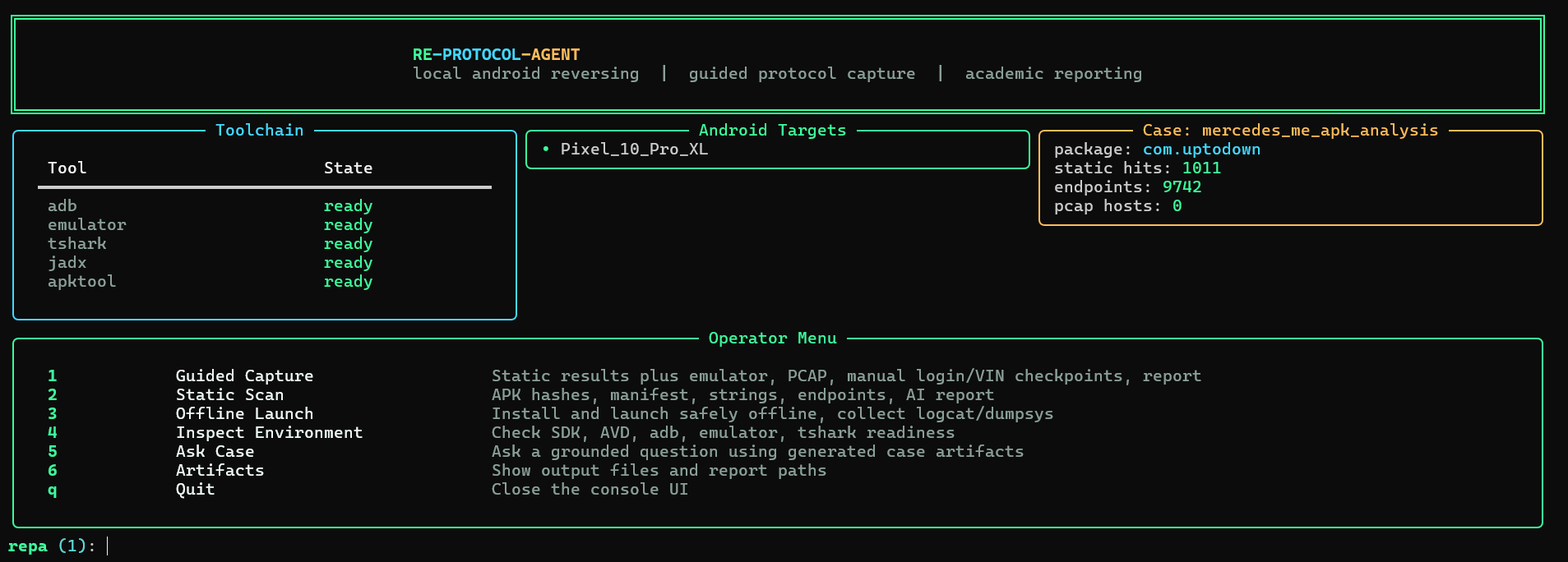
This project analyzed the Mercedes-Benz / Mercedes me mobile application research target using RE-Protocol-Agent, an AI-assisted local reverse engineering and protocol analysis tool. The goal was to inspect Android application artifacts, identify evidence related to connected vehicle workflows, and prepare the tool for protocol-level analysis through guided dynamic capture.
The main research focus:
VIN handling              →  where and how VIN appears in the app
Vehicle linking           →  pairing and registration flows
Garage / ownership        →  vehicle registration and account logic
Authentication flow       →  OAuth, token, login behavior
Region and market logic   →  locale, country, feature flags
Backend endpoint discovery→  recoverable API paths and hosts
Client vs server logic    →  what the app validates locally
The project stayed within legal and academic boundaries. It did not attempt to bypass login, bypass certificate pinning, brute force credentials, patch the app, or attack backend services.
2. Methodology {#methodology}
The project used static analysis, tool-assisted artifact extraction, emulator workflow testing, and report generation, all through RE-Protocol-Agent’s CLI.
The stages ran in this order:
 1. Create case folder
 2. Ingest APK artifact
 3. Generate metadata and hashes
 4. Analyze manifest data
 5. Search code and resources for relevant terms
 6. Extract interesting strings
 7. Extract endpoint and domain candidates
 8. Attempt dynamic emulator launch and capture
 9. Correlate generated artifacts
10. Generate AI-assisted summaries and Markdown reports
Start Case
→ Intake and Hashing
→ APK Identity and Manifest Analysis
→ Static Code and Resource Search
→ String and Endpoint Extraction
→ Dynamic Emulator Workflow ← (problematic stage, see Section 6)
→ Runtime Evidence Collection
→ Correlation
→ AI Summary
→ Final Markdown Report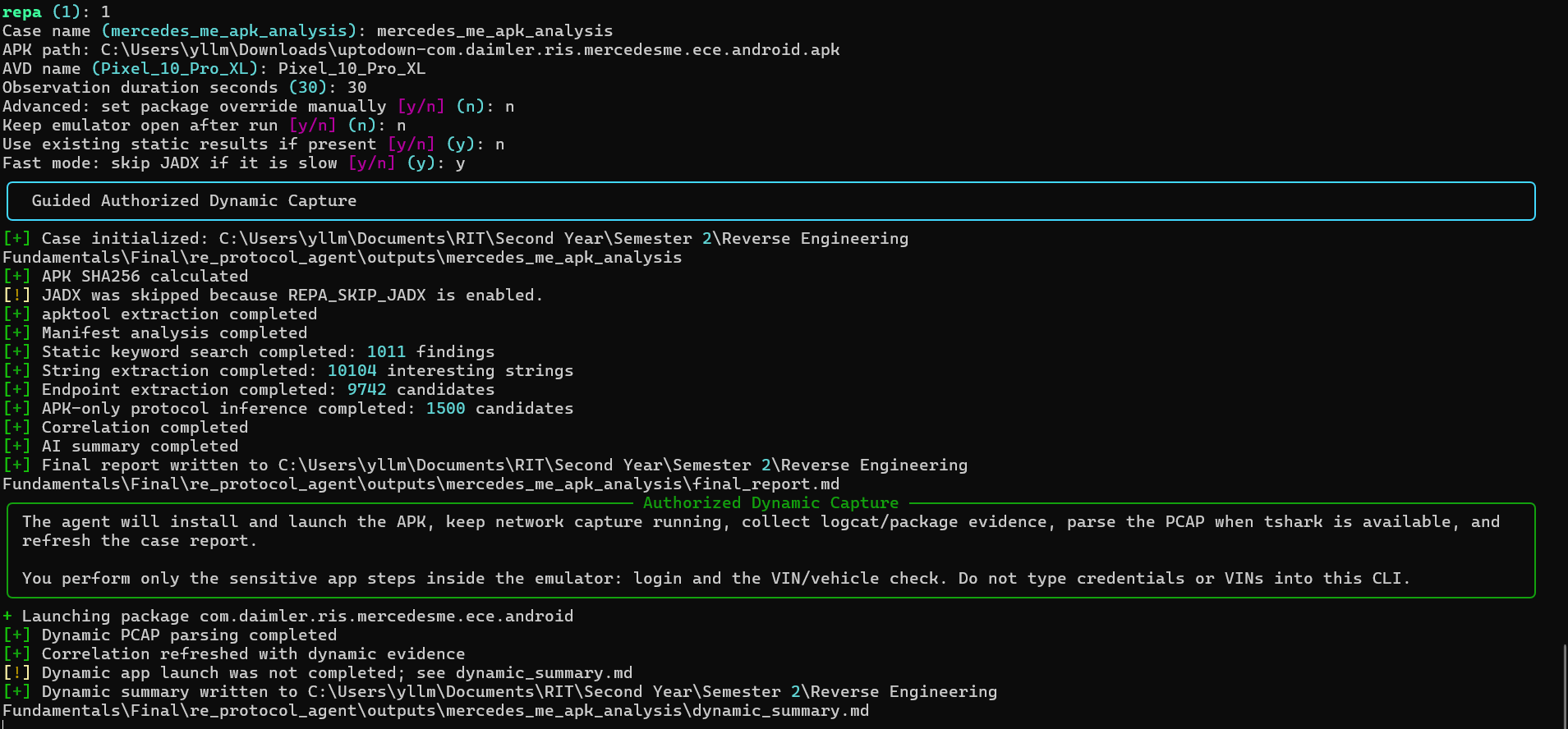
3. Tool Implementation {#implementation}
RE-Protocol-Agent is built around a central Controller that runs each module in order and writes artifacts to the output folder. This makes the workflow repeatable.
Controller
  │
  ├── Intake              →  metadata.json
  ├── Decompiler          →  extracted source files
  ├── Manifest Analyzer   →  manifest_summary.json
  ├── Code Search         →  static_findings.json
  ├── String Extractor    →  strings_interesting.json
  ├── Endpoint Extractor  →  endpoints.json
  ├── Dynamic Analyzer    →  dynamic_summary.json
  ├── Protocol Parsers    →  pcap_summary.json
  ├── Correlator          →  correlated_findings.json
  ├── AI Reasoner         →  ai_summary.md
  └── Reporter            →  final_report.md
The AI layer is intentionally limited. It does not reverse engineer the app directly. It reads local artifacts produced by deterministic modules and summarizes them. This reduces hallucination and keeps the report grounded in actual evidence.
4. Static Analysis Results {#static-results}
The static analysis portion was the most successful part of the project. The tool processed the Mercedes me research artifact workflow and generated structured outputs. It extracted metadata, searched for relevant concepts, and prepared files for later correlation.
The static search was organized around five evidence categories:
Category               What the tool searched for
──────────────────────────────────────────────────────────
Vehicle and VIN        vin, vehicle, garage, ownership,
                       pairing, activation, registration
Authentication         oauth, token, login, bearer,
                       credential, session, auth
Region and market      region, country, locale, market,
                       timezone, territory
Backend and API        endpoint, api, backend, telematics,
                       host, feature_flag
Interesting strings    URLs, domains, hardcoded values,
                       config references
App Artifacts
├── Manifest → Permissions and components
├── Resources → Config and UI text
├── Code → Logic and keyword matches
└── Strings → Endpoints and domain candidates
↓
Static Findings (static_findings.json, endpoints.json)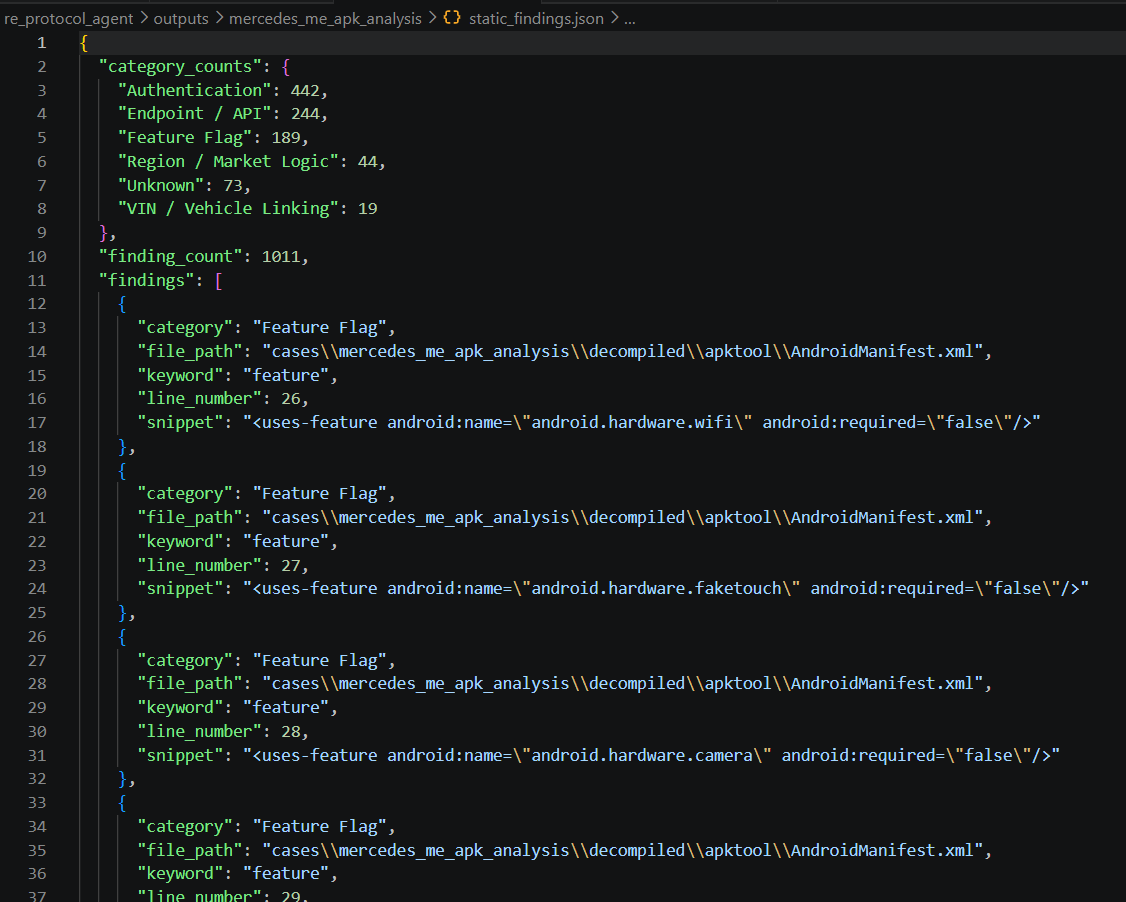
The static phase matters because it creates a map of what to look for during protocol analysis. If the static search finds terms related to vehicle linking, authentication, or region logic, the dynamic phase can check whether traffic contains related paths, hosts, or request structures.
5. Protocol Analysis Design {#protocol-design}
The protocol analysis portion is designed to be passive and evidence-based. The tool can parse local HAR, PCAP, and mitmproxy JSON artifacts. For PCAP files, it uses tshark when available.
Traffic Capture
  │
  ├── HAR Parser      →  HTTP methods, hosts, paths, status codes
  ├── PCAP Parser     →  DNS queries, TLS SNI, IPs, ports
  └── mitmproxy JSON  →  request and response metadata
        ↓
  Protocol Summary (protocol_summary.json / pcap_summary.json)
        ↓
  Correlation with Static Findings
The tool redacts sensitive values automatically: authorization headers, cookies, access tokens, refresh tokens, passwords, and long secret-looking strings. This keeps the report focused on structure and behavior rather than collecting credentials.
6. Dynamic Emulator Analysis {#dynamic}
The dynamic phase was added so the agent could handle as much of the runtime workflow as possible. The intended sequence:
User   →  Start guided capture
CLI    →  Begin dynamic workflow
Agent  →  Start Android emulator (AVD)
Agent  →  Launch target application
Agent  →  Start local PCAP and logcat capture
User   →  Manual login in app
User   →  Manual VIN or vehicle-flow check
Agent  →  Stop capture, parse runtime evidence
Agent  →  Generate updated final_report.md
The emulator portion was the hardest technical part. The emulator opened successfully, but the first dynamic workflow was misconfigured and launched the Uptodown app store instead of the intended Mercedes me application runtime. This was a dynamic launch configuration problem, not a failure of the static analysis work.
The tool was improved after this issue. It now performs stronger package identity checks and records clearer dynamic status in dynamic_summary.md.
7. Course Correction {#course-correction}
During testing, the dynamic launch behavior did not match the intended workflow. The emulator opened but the app launch went to Uptodown instead of the Mercedes me runtime. This forced a course correction.
The root cause was that the launch logic was using the download source or filename to determine the package, rather than validating the actual declared package identity inside the APK. A filename and download source are not reliable identifiers.
Dynamic Launch Attempt
  → Emulator opens successfully
  → Wrong app launches (Uptodown store)
  → Investigate: check declared package identity
  → Fix: validate package name, label, launchable activity
         before launch
  → Improve: block or log misconfigured launch attempts
  → Result: cleaner dynamic runs going forward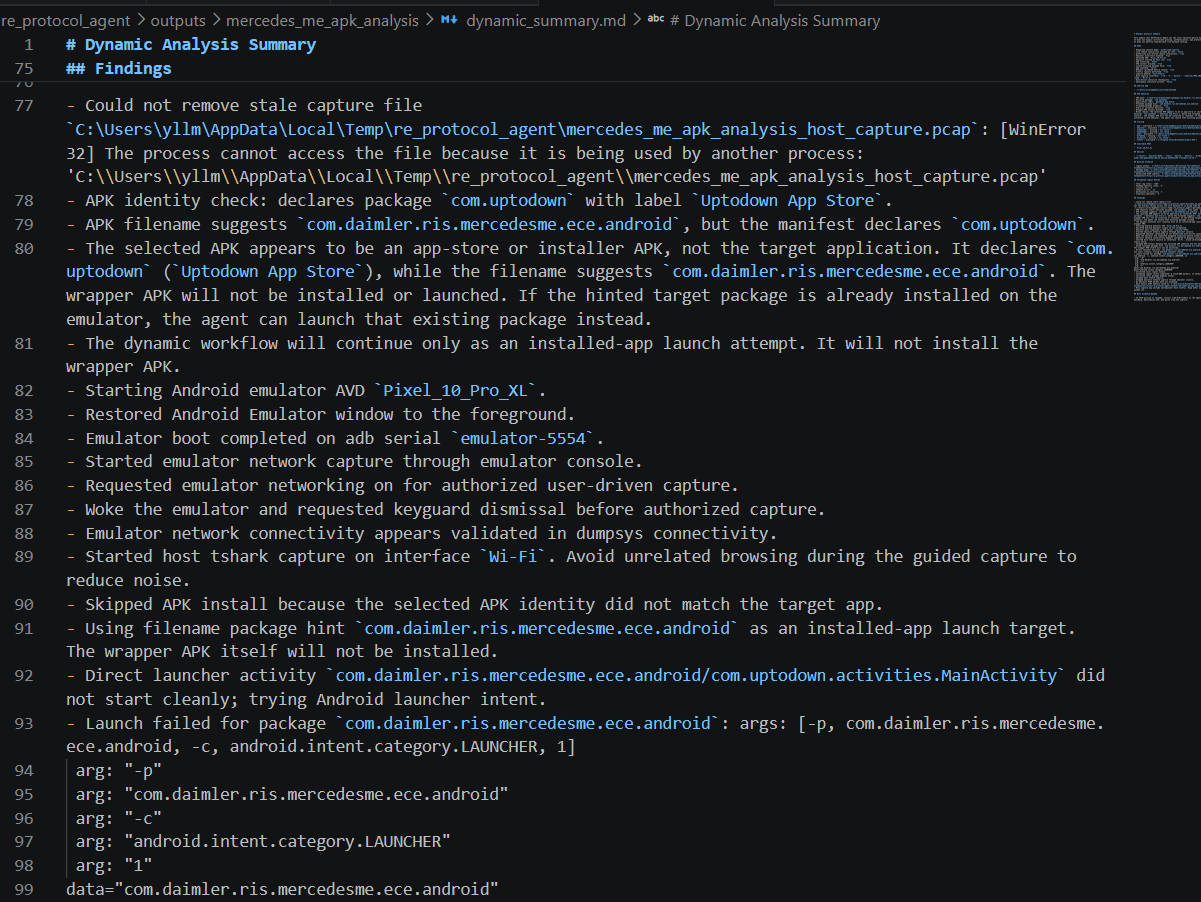
This course correction improved the tool. Instead of silently analyzing the wrong runtime behavior, it now reports when the launch target needs correction. The lesson was clear: dynamic mobile analysis requires package identity validation before launch, not after.
8. Findings Summary {#findings}
Finding                                              Status
───────────────────────────────────────────────────────────────────────
Modular local RE pipeline implemented                Confirmed
Static analysis pipeline functional                  Confirmed
Metadata and manifest extraction working             Confirmed
Keyword, string, and endpoint extraction working     Confirmed
Structured JSON and Markdown outputs generated       Confirmed
AI summarization grounded in local artifacts         Confirmed
Dynamic emulator workflow partially implemented      Partial
First dynamic launch misconfigured (Uptodown)        Identified and fixed
Mercedes me protocol capture complete                Not yet completed
Confirmed Mercedes-Benz vulnerability                Not claimed
No confirmed Mercedes-Benz vulnerability can be claimed from the current evidence. The project produced a working analysis framework and identified exactly what is needed to complete the protocol validation phase.
9. Validation {#validation}
The static workflow was validated by confirming the expected output files were generated:
outputs/<case_name>/
├── metadata.json               ✓
├── manifest_summary.json       ✓
├── static_findings.json        ✓
├── strings_interesting.txt     ✓
├── strings_interesting.json    ✓
├── endpoints.json              ✓
├── correlated_findings.json    ✓
├── ai_summary.md               ✓
├── final_report.md             ✓
└── dynamic_summary.md          ✓ (partial, launch issue recorded)
The dynamic workflow was validated partially. The emulator could open, the tool could interact with Android tooling, and runtime summaries could be generated. The problem was that the launch target was not correctly aligned with the intended app runtime. The emulator infrastructure exists, the final app-specific protocol capture still needs work.
10. Limitations {#limitations}
The biggest limitation is the dynamic protocol analysis. The static reverse engineering part was completed, but the protocol phase could not be fully validated because the emulator launch needs to work correctly with the intended Mercedes me application.
What could not be completed yet:
  - Reliable launch of the intended Mercedes me runtime
  - Complete guided login and VIN-flow capture
  - Clean protocol capture from real app behavior
  - Correlation of live traffic paths with static endpoint findings
  - Evidence-based conclusions about backend validation behavior
The tool is ready for this workflow. The emulator and app launch setup need more refinement before the protocol phase can run cleanly.
11. What I Would Do With More Time {#next-steps}
The most important next step is making the emulator part work correctly for the intended application. The protocol reversing depends on it entirely.
Priority   Next Step
─────────────────────────────────────────────────────────────
  1        Improve package detection and launch selection
  2        Support split APK or app bundle installation
  3        Verify Google Play Services requirements
  4        Tune emulator environment closer to real device
  5        Capture a clean authorized login and VIN-flow session
  6        Parse resulting PCAP or HAR data
  7        Correlate observed traffic with static endpoint candidates
  8        Update report with confirmed protocol evidence
Improve Emulator Setup
→ Correct App Launch
→ User Login Checkpoint (manual)
→ User VIN Flow Checkpoint (manual)
→ Clean Traffic Capture
→ Protocol Parsing
→ Static + Dynamic Correlation
→ Final Evidence-Based FindingsWithout a correct dynamic run, the protocol analysis can only remain partial.
12. Security Conclusion {#security-conclusion}
At this stage, I cannot responsibly claim that a vulnerability was found. The evidence does not include a complete captured Mercedes me protocol flow from a successful guided dynamic run.
Current evidence state:
  Static analysis        →  completed
  Tool development       →  completed
  Dynamic workflow       →  partially implemented, launch issue found
  Protocol validation    →  incomplete
  Confirmed vulnerability→  none: not enough evidence yet
The correct conclusion is that more testing is needed before making any security claim. If a future dynamic run reveals suspicious behavior, it would need to be validated with clear evidence before disclosure.
13. Reflection {#reflection}
This project taught me that reverse engineering is not only about reading decompiled code. A large part of the work is building the environment, validating the target, checking assumptions, and making sure the evidence actually supports the conclusion.
The hardest part was dynamic mobile analysis. Getting an emulator to open is easier than getting the correct application runtime, account flow, traffic capture, and report pipeline to all work together cleanly.
Most useful techniques:
  APK metadata extraction        →  quick app identity check
  Manifest analysis              →  permissions, components, deep links
  Package identity validation    →  prevents analyzing the wrong target
  Keyword-based static search    →  finds relevant code locations fast
  String and endpoint extraction →  builds the protocol hypothesis
  Emulator automation            →  removes manual setup steps
  PCAP parsing                   →  passive protocol evidence
  Grounded AI summarization      →  organizes evidence without inventing it
  Markdown report generation     →  reproducible, readable output
The biggest lesson is that an AI-assisted reverse engineering tool should not replace evidence. It should organize evidence, highlight patterns, and help explain results. The analyst still needs to validate what happened and avoid overclaiming.
That principle evidence first, conclusions second is the most transferable thing I took from this project.